
Construction Takeoff App for iPad
A PDF viewer built for construction workflow. Review blueprints, mark up, take notes, draw, calibrate page scale, and perform quantity takeoff on the drawing itself with Apple Pencil, tallied in real time and exported to PDF or Excel.
Every takeoff reduces to three.
Still shuffling paper and blueprints? You’re not alone. Most of the industry still works from traditional paper-based processes, manual workflows, and information that arrives late. Go digital: cleaner documents, faster communication, critical numbers in the right hands before they go stale.
Need material quantities right now? Run one of the free contractor calculators.
Three steps, all on the drawing.
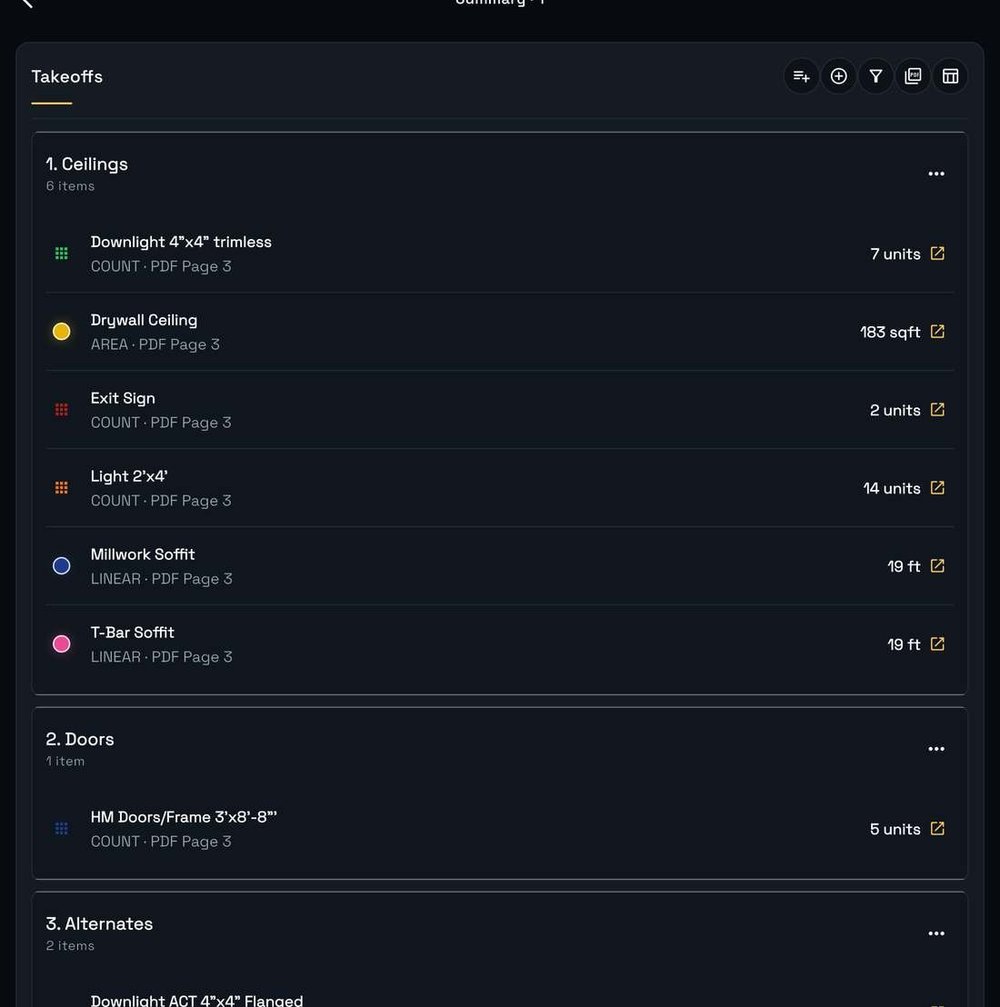
Review and export.
Grouped by scope with live totals, each line jumping back to its mark. Export to PDF or Excel.
Summary and Totals ›Slide for the next step.
Features
Projects and Plan Sets
Import a PDF plan set and work it sheet by sheet. Each project shows its page count, its status, its running takeoff count, and whether it is synced.
Scale and Calibration
Trace a distance you already know, enter what it represents, and every measurement after that lands in real feet. Printed title block scales do not survive reprographics reliably, so calibrate and verify. Scale is set per sheet.
Takeoff Tools
Count in each, linear in feet, area in square feet, plus cut outs for openings you do not want counted. Name the item and assign it to a scope group before you draw. Markup, notes, sketching and site photos sit on the same drawing.
Apple Pencil
Add a takeoff item, then tap with the Pencil for counts and draw for linear and area. Stabilization smooths the line as you trace, and Scribble turns handwriting into text. An active stylus keeps working in normal work gloves.
Summary and Totals
Every takeoff grouped by scope, with per item quantities and a project roll up by count, area and linear. Each line cites its PDF page and jumps back to the mark. Export to PDF or Excel.
Offline and Sync
Local first storage, so the plan set and every mark stay on the device when the signal does not. Projects show a sync status so you can see when everything is up to date.
Scroll sideways for more.
Take off walls, ceilings, floors, electrical, doors, HVAC, lights, whatever is on the plan. The long form walkthrough is in How to Do a Construction Takeoff on iPad.
Subcontractors and trade contractors pricing their own scope, general contractors checking sub numbers before buyout, estimators who would rather measure at the jobsite than carry the set back to a desk, and project managers and superintendents confirming what was drawn against what is being built.
Dimecraft Takeoff PDF is free. It is currently in beta while we refine and test the product before launch, and the iPad release is coming to the Apple App Store.
Add your email and we will send the App Store release as soon as it is announced.
Join the list